
Introduction
If you use Query Groups in Google Search Console regularly, you’ve likely noticed the sheer number of individual search queries driving your site’s traffic. Tracking and analysing each query can be tedious, especially when many queries are similar in intent. Google has now addressed this with the announcement of Query Groups in Search Console Insights.
What are Query Groups?
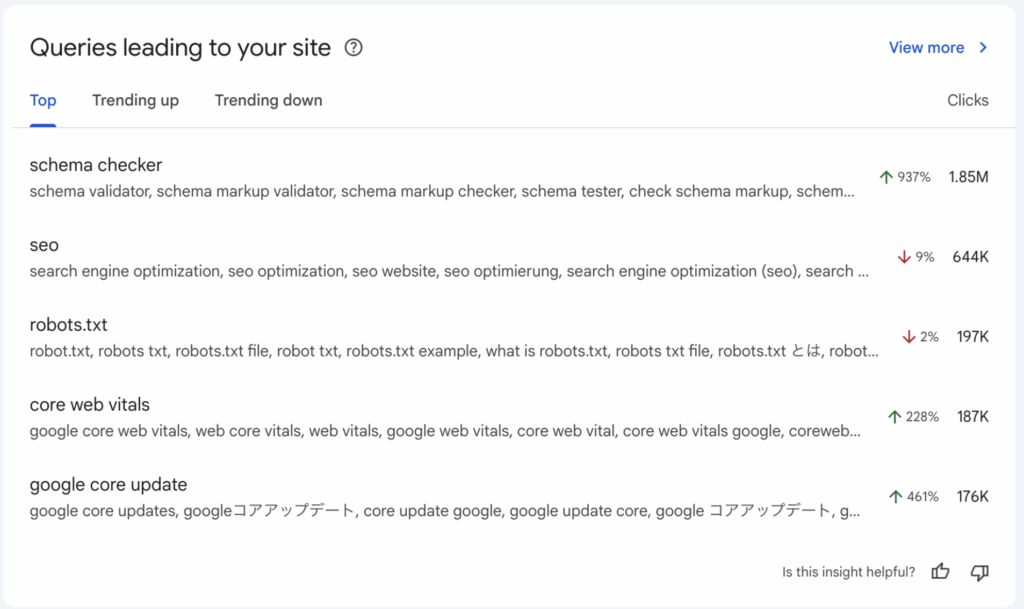
“Query Groups” is a new feature in Search Console Insights that automatically clusters similar search queries into a group based on user intent. Instead of viewing dozens (or hundreds) of slightly varied queries, you’ll see groups that represent core user intents.
For example, instead of separate entries for:
- “schema validator”
- “schema markup checker”
- “check schema markup”
You’ll now have one group that bundles all those under a unified intent label.
Importantly, Google states this grouping does not affect ranking — it is purely to help you analyse performance better.
Why it matters for SEO & website owners
Here are the key benefits:
Trends & prioritization
Google’s feature includes tabs like “Top”, “Trending up”, “Trending down” for query groups. This helps you spot rising topics fast.
Simplifies your data analysis
Rather than sifting through hundreds of queries, you can see “what topic” users are searching for, rather than just the raw phrasing variation.
Improves content strategy
When you know which “query groups” are driving clicks, impressions or trends (up or down), you can create or optimise pages aligned to those groups, not just exact keywords.
Supports intent-based optimisation
Since groups cluster by intent, you can better align content to what the user wants, rather than just matching keywords. Bolt this with the advice that long-tail and intent-specific keywords often provide less competition.
How to use Query Groups (step-by-step)
Step 1: Open Search Console Insights
Navigate to the “Queries leading to your site” card. The Query Groups section will appear (if available) for properties with sufficient query volume.
Step 2: Review the groups
Look at the groups under:
- Top – highest click volume
- Trending up – groups gaining momentum
- Trending down – groups losing traction
Click into a group to see the specific queries included.
Step 3: Map to your content
For each group:
- Identify which landing pages are ranking for it.
- Check whether the content fully satisfies the intent behind the group (informational, transactional, etc).
- If you find a group with many impressions/clicks but a page that is only loosely relevant, consider creating a dedicated page or optimising the existing one.
Step 4: Update titles, headings, content
If a query group is strong, you can fine-tune your page’s title, headings (H1/H2), and body to reflect the group’s intent, rather than chasing every variation separately. This will reinforce to Google and users that your page covers the full topic.
Step 5: Internal linking & cluster structure
Use internal links to point from broader topic pages (pillar pages) to pages that address specific query groups. This reinforces your theme and helps distribute SEO value.
Step 6: Monitor & iterate
Refine your approach: watch how groups shift, which are trending, and update your content accordingly. Since the grouping logic may evolve as Google’s AI detects new patterns.
Best practices & tips
- Don’t just look at the label of the group — click through to see the actual queries to understand nuance.
- Focus on groups where you already have visibility (impressions or clicks) but could gain more by optimising — these are usually lower-hanging.
- Use this feature in tandem with your keyword tool data (volume/competition) to validate opportunities.
- While the feature simplifies query variation, you still need to align search intent with the content format (guide, how-to, list, comparison etc).
- Keep your metadata (title, meta description) compelling. Even if you’re ranking, a low click-through rate (CTR) may indicate mismatch or weak presentation.
- Use topic clusters: one pillar page + supporting pages that address specific query groups under that pillar.
- Remember: Query groups do not change how Google ranks your pages — they are a reporting/insight enhancement.
Summary & next steps
The introduction of Query Groups in Search Console Insights is a meaningful enhancement for SEOs, Digital Marketers and site owners. Instead of drowning in query variation, you can now view the topic families your traffic comes from, and optimise accordingly.